InforHMS SetUp Guide
Overview
This document will help you gather all credentials for connecting InforHMS with Skypoint MDSP.
Prerequisite
You must have the following details:
- InforHMS account
- API for integration.
To call API
SkyPoint will expose API for the following five entities:
- Reservations
- GuestProfile
- Inventory
- Rate
- GuestStayRevenue
Once the APIs are called, a data dump will be created in your SkyPoint integrated Storage account.
Finding Storage account
The Storage account name will be shared with you from SkyPoint.
Finding Account key
The Account key will be shared with you from SkyPoint.
Selecting Storage Path
Follow the below steps on the Skypoint platform Configuration page to select Storage Path:
- Click the folder icon in Storage Path text area.
- Select raw-data and then select the folder inside it.
- Select HMS.
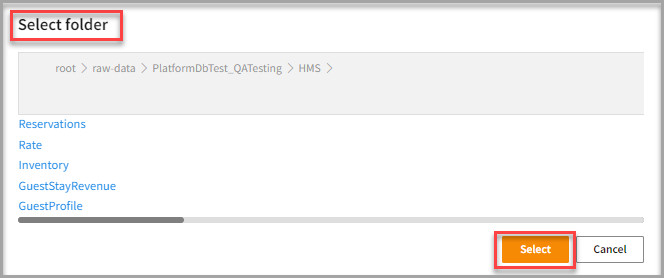
- In the HMS folder, click Select.
❕ Note: Follow the steps in Connecting to InforHMS import connector to complete your integration.